Report Description
This report is used as a sign in/sign out sheet with expected time in/out, actual time in, and a signature field.
Report Conditions
- Semester must be selected
Sample Report
Click the report name to view a sample: Sign In- Daily Signin For Week - PDF Version 2.pdf
Accessing the Report
-
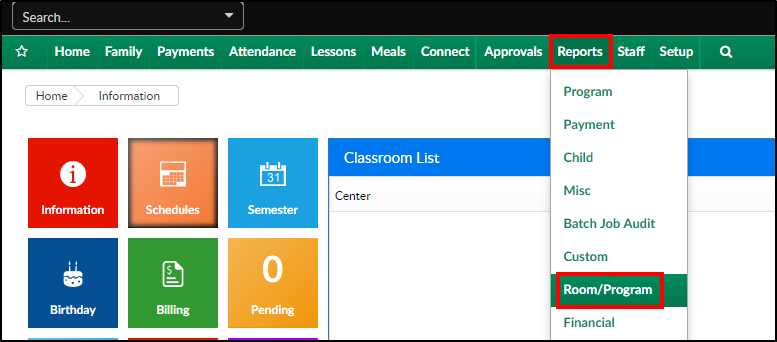
From the Reports menu, click Room/Program
-
From the Report Category drop-down, select Sign In

-
Choose Daily Group Sign In (Compressed) - PDF from the Report drop-down

-
Select any necessary Search Criteria
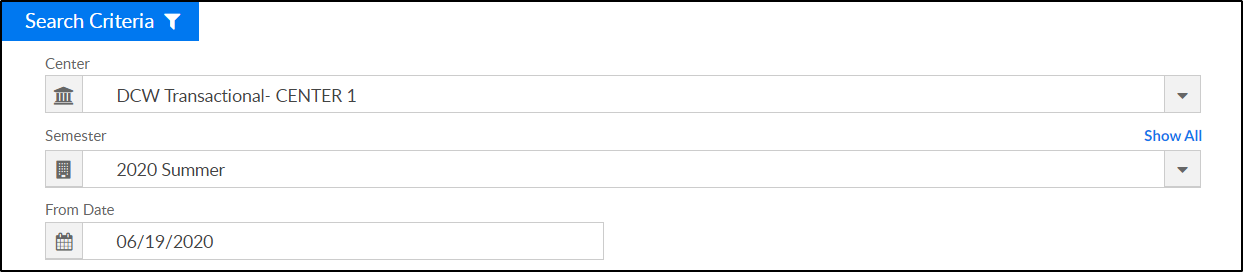
- Center - select the center from the drop-down, leaving blank will pull all centers
- Semester - choose a semester this is required
- From Date - the sign in sheet will pull for the selected date
-
Click Create Report. The requested report will open in PDF format
Report Fields
- Center Name & Address
- Date
- Child's Name
- Expected Time In
- Signature
- Expected Time Out
- Time Out
- Signature
- Notes