Year-end can feel overwhelming, but Procare gives you the tools and resources you need to prepare W2s, 1099s, and other essential reports, and to reconcile your accounts. Below you’ll find guidance on the most common year-end questions.
Tax Essentials
Review information and guidance on common tax questions and scenarios
W2s and Tax Forms
Tax Tables
Vendor Tracking
How do I set up Vendor Tracking for 1099s?
Beginning Balances
More Tax Resources
End of Year Reconciliation
Financial reconciliation ensures your records are accurate and aligned. As we close out the year, here are key resources and tasks to help you stay on track:
Getting Started
If you are new to reconciliation, you may like to review our Reconcile First Time article.
Common Scenarios
For Bank Statement Reconciliation
If you have a digital payment that was successfully processed but did not post to the ledger, follow these steps
Recommended Year-End Tasks
FAQ
Can I show a housing allowance on W2s?
Yes. You may wish the housing allowance to appear in a specific box on the W2, for example, the box for “other”. If you are using Procare W2 / 1099 Software, you can manually edit W2s for that person as needed. Contact your tax adviser or the IRS to determine how the information should be reported.
How can I tell if I have the most current tax tables?
From the Procare Home screen, go to Configuration > System > Accounting Management > Payroll > dbl-click Payroll Formulas. At the Payroll Formulas screen, choose either the Federal or State category (top left). On the right-hand side of the screen you’ll see a Start Date which indicates the effective date. In most cases this will be January of the current year. Mid-year changes will show a date after January 1st.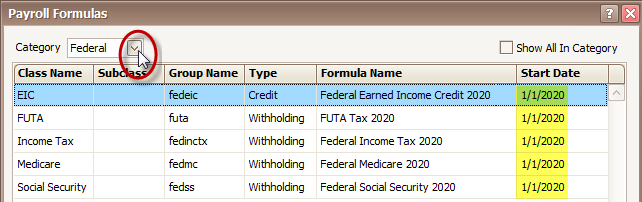
How do I get the tax tables for the new year?
If you are downloading the tax tables for the first time,

learn more about how to download the initial tax tables.
If you need to update, learn more about how to update your taxes for the new year.