.png)
Procare is dedicated to ensuring that each program and its parents/guardians have the tools to succeed in any environment.
Your center decides how parents/guardians sign in/out. This article explains the sign-in/out process for centers that use the Parent Kiosk option. Ask your center if they use a Parent Kiosk and where it is located.
KinderSystem Texas Requirements
In September 2026, the state of Texas adopted new requirements for collecting and submitting child attendance records for subsidized child care. Check with your center to verify they use this process, then click on the KinderSystem Texas tab below for state-specific instructions.
Locate the Parent Kiosk device. The window should look similar to this.
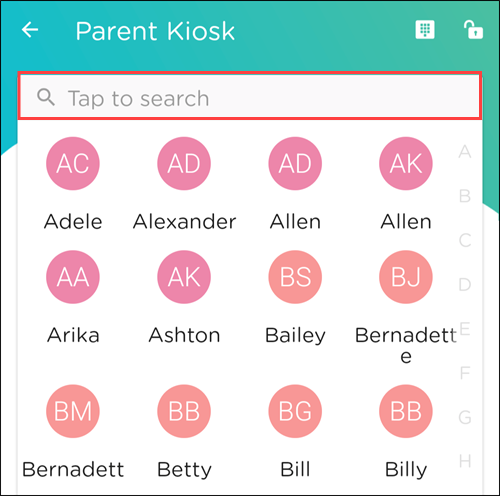
Tap to select your child from the list or tap to search and enter a child’s name.
A List of Pickups is displayed. Tap your name to continue.
Tap your child or children’s name(s).
Tap Sign-In/Out.
Your center may have questions for you to answer before you can continue. Answer the questions.
Tap Submit.
Your center may require your signature; if so, sign your name.
Tap Done.
A confirmation message appears.
Procare Child Care Mobile App Permission
If you are using the app for the first time, Procare will need access to your photos on your mobile phone.
Locate the Parent Kiosk device. The window should look similar to this.
Tap to select your child from the list or tap to search and enter a child’s name.
A List of Pickups is displayed. Tap your name to continue.
Tap your child or children’s name(s).
Tap Sign-In/Out.
Your center may have questions for you to answer before you can continue. Answer the questions.
Sign your name.
Add your photo. This must be taken at the time of the sign-in/out with your mobile phone’s camera.
Tap Use Photo.
If you need to retake the photo, tap Retake.
Tap the back arrow to return to the signature window. Tap X to return to the child selection window.
A map preview with a pin shows your location. Tap Sign-in/out to complete the sign-in/out process.
A confirmation message appears.
Location Capture Problems?
If the location looks incorrect, tap Try Again to update the pin. The pin cannot be dragged or manually adjusted.
Error Messages
Location is turned off - permission denied or no access
The location is required to complete the sign-in/out. Request help from the center’s staff.
We couldn’t get your location - unavailable or timeout
A location is required to complete this sign-in/out. Tap Try Again.
The device couldn't lock onto a GPS signal in time to complete the process — this is a common issue indoors or in areas with weak signal strength. Moving closer to a window or door can help.
Tapping Try Again is the only way to proceed; this step cannot be skipped.
If the issue persists, request help from the center's staff.
Sign-In/Out Notifications
| Parents/guardians can select the type of notifications they want to receive from the Procare child care mobile app. In the app, tap Menu |

 > Edit Profile
  > scroll to Push Notifications > tap the checkbox(es) to select your preferences.
FAQ - Texas Attendance Requirements
Starting September 1, 2026, the Texas Workforce Commission (TWC) requires a photo, a signature, and the device’s location to be captured every time your child is signed in or out if your child receives state child care subsidy assistance.
Parents/guardians with students who do not receive state funding will still need to follow the new sign-in/sign-out requirements. Procare is working to make an update available as soon as possible that will allow parents/guardians who pay for their children’s care privately to opt out of these additional requirements, according to your child care provider’s policy.
Contact your provider for additional questions for how they are handling the Texas Attendance Requirements.
What do I need to do?
When signing your child in and out with your child care provider, either a parent/guardian or child care staff member needs to provide a photo, signature and confirm the location through the Procare child care mobile app, using a compatible Android or iOS device. Please make sure your app is updated to the latest version to ensure that the sign-in features are active.
Do I need to download an app?
If a parent or guardian is signing a child in or out, they may need to download the Procare child care mobile app to a compatible personal device to meet these requirements. Your child care provider may have alternative options, such as having staff sign a student in or a shared compatible device. Please discuss with your child care provider for more details on their specific policies.
What information does the Procare child care mobile app collect?
Each time a child is signed in or signed out, Procare will collect a signature and photo of the parent, guardian or staff member at the moment of sign-in and/or sign-out, as well as geolocation data on the device being used for sign-in and/or sign-out. This information is transmitted to the state of Texas according to new state requirements. Information from families with children that do not receive state funding will not be sent to Texas.
What if I do not have a smartphone or my phone is not compatible?
Child care staff members can also provide the required photo and signature at sign-in or sign-out. Let your child care provider know as soon as possible so they can work with you on the best solution.