Report Description
The Center Sign In For Week tracks attendance by day for the entire week. If search criteria is left blank, all classrooms and students will display in one chart.
Report Conditions
- Leaving Center, Category, and classroom blank will pull data for all students at all locations
Sample Report
Click the report name to view a sample: Center Sign In For Week.pdf
Accessing the Report
-
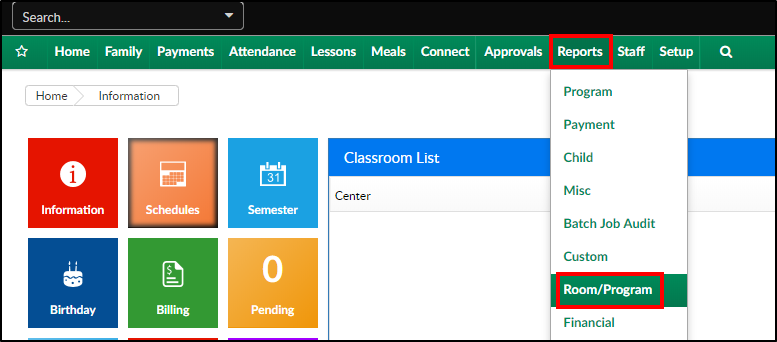
From the Reports menu, click Room/Program
-
From the Report Category drop-down, select Sign In

-
Choose Center Sign In For Week - PDF from the Report drop-down

-
Select any necessary Search Criteria
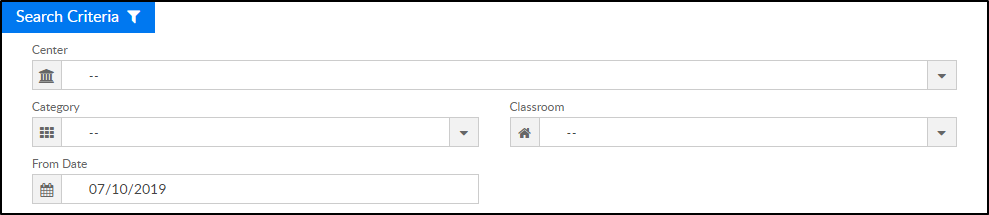
- Center - select the center from the drop-down, leaving blank will pull all centers
- Category - select a category to view students by category
- Classroom - choose a classroom from the list, if applicable
- From Date - the sign in sheet will pull for the week surrounding the selected date (Monday-Friday)
-
Click Create Report. The requested report will open
Report Fields
- Center & Address
- Date
- Classroom
- Grade
- Child Last Name
- Child First Name
- Time In
- Signature
- Time Out
- Signature