Report Description
The Center Sign In Ver 2 tracks attendance for the selected date.
Report Conditions
- N/A
Sample Report
Click the report name to view a sample: Center Sign In Ver 2.pdf
Accessing the Report
-
From the Reports menu, click Room/Program
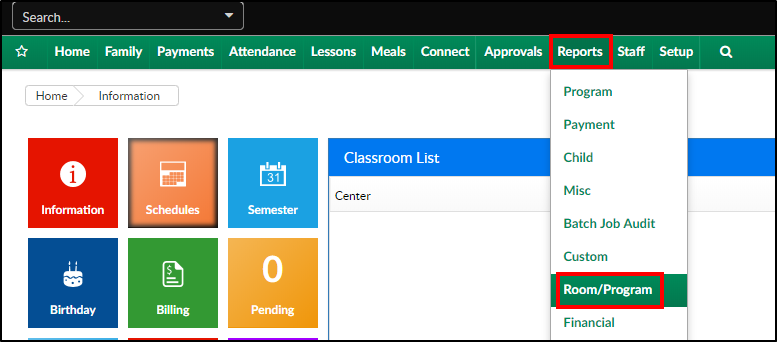
-
From the Report Category drop-down, select Sign In

-
Choose Center Sign In Ver 2 - PDF from the Report drop-down

-
Select any necessary Search Criteria
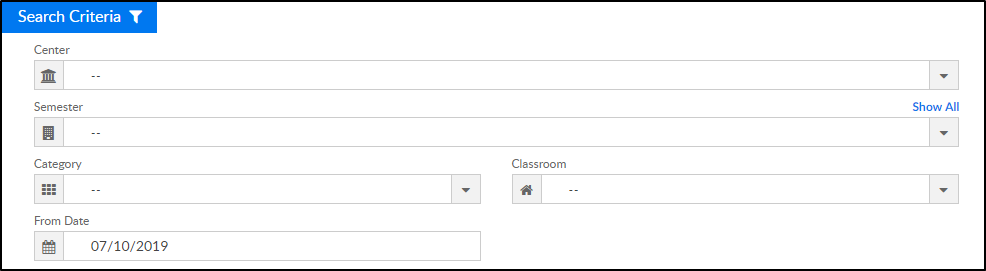
- Center - select the center from the drop-down, leaving blank will pull all centers
- Semester - choose a semester, if applicable
- Category - select a category to view students in the selected category
- Classroom - choose a classroom from the list, if applicable
- From Date - the sign in sheet will pull for the week surrounding the selected date (Monday-Friday)
- Click Create Report. The requested report will open in PDF format
Report Fields
- Category
- Classroom
- Semester
- Center
- Classroom Times
- Date
- Child Name
- Grade
- Time In
- Signature
- Time Out
- Signature