Update October 30th
The release of Version 2025.15 addressed several of the intermittent issues that were identified earlier this week.
Update October 28th
Following the release of an update for Version 2025.14.1 on October 25th, we’ve resolved two issues identified in earlier versions that affected payment posting and batch processing.
Some point-of-sale (POS) transactions were not posting to ledgers as expected.
Customers with multiple profiles experienced errors when running batches.
Both issues have been addressed in the update for Version 2025.14.1. If you previously encountered either issue, normal functionality should now be restored.
Update October 22nd
Following the release of Version 2025.14.1, we’ve identified a few intermittent issues that may affect payment posting and ledger accuracy. We’ve outlined the known scenarios below along with suggested steps you can take if you notice any discrepancies.
Current and Resolved Issues
Identified Issue | Recommended Action | Status |
|---|---|---|
Some point-of-sale (POS) payments are not posting to ledgers. Includes Swipe, Check-In, MyProcare, and TE POS transactions. |
| Resolved with Version 2025.14.1 update on October 25th |
Some MyProcare payments are unposted and missing from Pay Recon |
| Ongoing |
Some scheduled payments are incorrectly adding the surcharge twice to the ledger total. This is a display issue only, customers were not charged twice, and card transactions are accurate. For example, a scheduled payment of $100 (which includes a $2 surcharge) is correctly charged to the customer, but the ledger incorrectly shows $102. To fix this, enter a manual ledger adjustment of -$2:00 to remove the duplicate surcharge. | No duplicate charges were made. Card transactions are accurate, and customers were charged the correct amount. The issue affects only the ledger display.
| Resolved with Version 2025.15 released on October 30th |
Some payments processed using Horizon Touch card readers may appear as declined, even though the payment was successful. In these cases, the transaction is not posted to the ledger |
| Resolved with Version 2025.15 released on October 30th |
Some payments are charged to a removed payment method despite an updated method being saved | Our Development team is looking into this issue. | Resolved |
Overview
Several October releases address issues related to reconciliation and ledger accuracy. We’ve highlighted these changes below, along with the effective fix dates and some frequently asked questions, to help you understand them.
Please review to understand how these updates may affect your workflow and whether any follow-up action is needed.
We deeply appreciate your patience and your continued partnership with Procare Solutions. We understand that we have a responsibility to earn back your confidence, and we are dedicated to providing the reliable service you expect from us.
Automated Reconciliation Process
In some cases, payment records showed mismatches between what was expected and what was actually processed. These discrepancies could lead to inaccurate ledger balances and required manual correction.
Solution: As of October 5, an automated reconciliation process runs when you open the Process Tuition Express or Automated Online Posting screens. This process identifies and corrects any mismatches between expected and processed payment amounts, helping to keep your ledger accurate.
Automated Reconcilation Active: Active from October 5.
Scope: This only affects transactions from October 5 onwards (payments made before this date are not included in the automated reconciliation process).
Action Required: No manual action is needed. However, please ensure that you remain on the Tuition Express screen until the reconciliation process completes.
Open Process Tuition Express or Process Automated Online Posting from the menu.
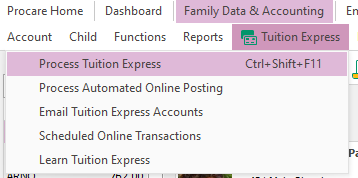
Please note that this process may take some time to complete. Do not close or exit the screen while processing is in progress.
.png)
Important: Please allow time for the process to complete. Do not exit the screen until you see the ‘Ready’ message.
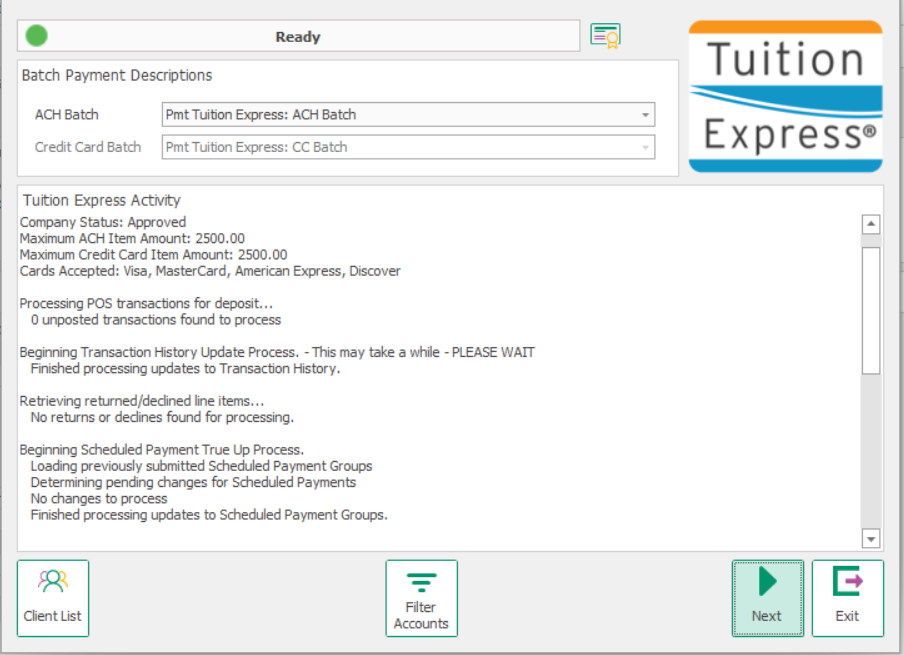
Understanding $0 Payments and the True-Up Process
Failed payments were indicated on ledgers with $0.00 from October 5 to October 9
Starting October 9, these adjustments will appear as reversed payments instead of zero-dollar entries.
A technical issue caused some declined payments to be incorrectly recorded as successful in the ledger. This discrepancy created challenges in maintaining accurate financial records and reconciling accounts.
To correct the issue, we introduced a temporary fix called the True-Up Process, which ran from October 5 to October 9. This process automatically adjusted affected transactions by offsetting the original payment amount. The goal was to restore balance in the ledger without requiring manual corrections.
As a result, you may see payments with a $0 transaction value. This indicates the system has balanced your ledger by offsetting a payment that couldn’t be processed due to incomplete payment profile information. These are validation errors within the system, not declines from the payer’s bank. Please see Payment Profile Errors for more information.
If a payment was declined due to a validation error, the True Up process offset the original amount to balance the ledger, changing the transaction value to $0. This is expected behavior for this time period and indicates the adjustment completed successfully.
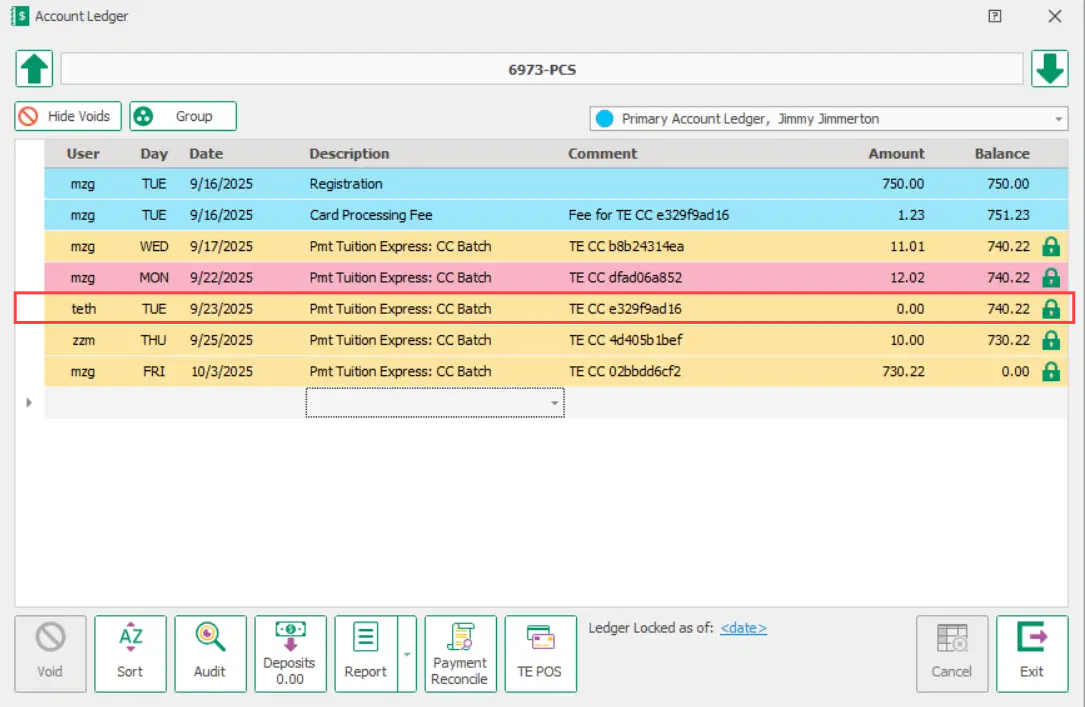
Solution: Starting October 9, transactions that failed validation will no longer show as $0.00. Instead, they will appear as voids, which clearly show that the transaction didn’t go through. This makes it easier to understand what happened and keeps your ledger accurate.
Timeline
Issue Period: August 8 to October 5, some failed transactions were incorrectly marked as successful in ledgers.
True-Up Process Active: October 5 to October 9. The system corrected failed payments for this time period by posting $0.00 entries for payer profile validation-related errors. The True-Up process did not include payments before October 5.
Fix Applied: October 9. The True-Up Process is no longer needed, and system enhancements prevent this issue from recurring.
Action Required: None.
Surcharge Fees Now Voided After Failed Payments
Summary of Issue: Surcharge fees were not consistently removed from the ledger when payments were declined or cancelled. This led to inaccurate ledger balances, as the card processing fees remained on the ledger even though the associated transactions failed.
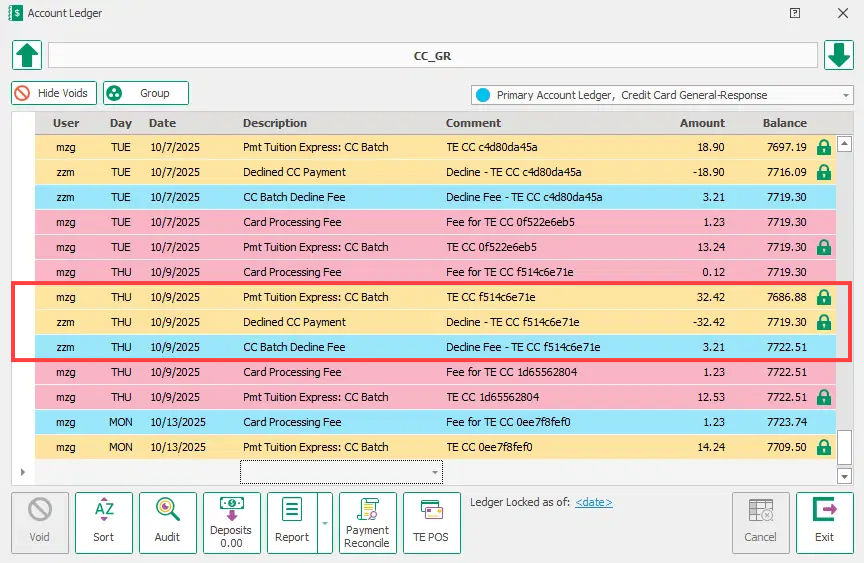
Solution: The Reconciliation process has been updated to automatically void surcharge fees when payments are declined, ensuring ledger accuracy.
Timeline
Issue Period: August 8 to October 9
Fix Applied: October 9
Action Required: None.
Any surcharge data not voided before October 9 was communicated via email and may already be resolved. If you require assistance with voiding surcharge fees for failed transactions prior to October 9, please see the support article How To: Manually Void Card Processing Fees
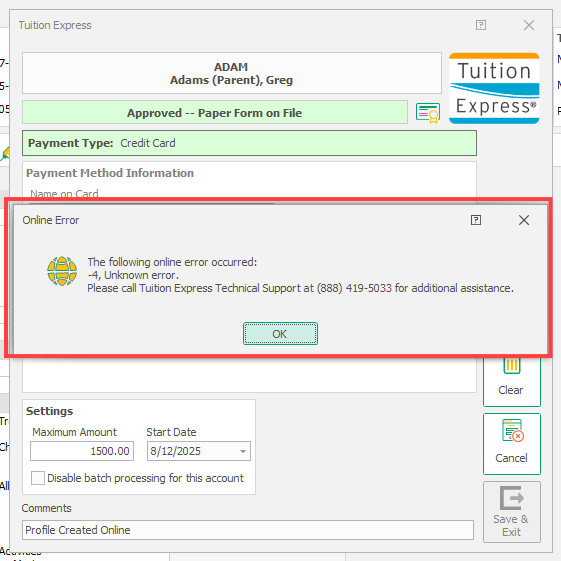
Payment Profile Errors: (-4 Unknown Error)
A system error known as -4 Unknown Error affected some payment profiles and prevented transactions from processing successfully. These failures were caused by validation issues within the system, not by declines from the payer’s bank.
To correct this, any affected transactions between October 5 and October 8 were automatically adjusted in the ledger to show a $0.00 entry. This adjustment was part of a temporary fix called the True-Up Process, which helped balance accounts and maintain accurate records.
Solution:
We've resolved an issue where payer profiles without a default payment method could fail with a "-4, Unknown Error."
The system now automatically selects the payment method if only one exists, or displays a clear error message if multiple methods exist without a default. The -4 error may still appear on profiles, but will no longer prevent payment processing.
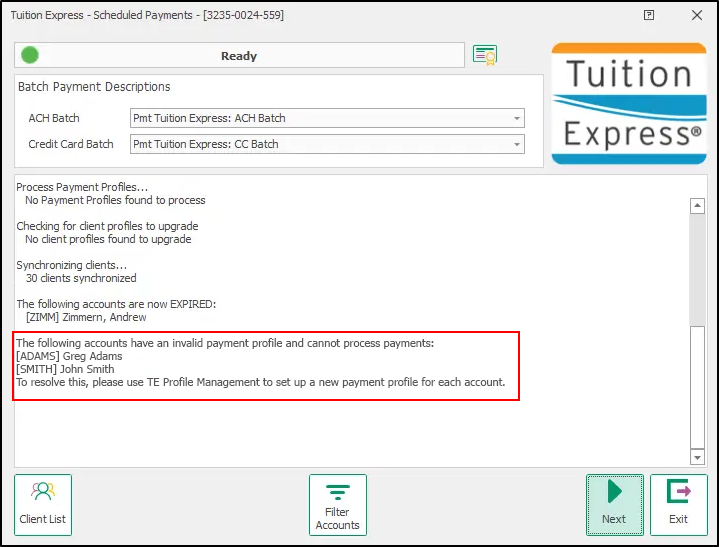
There is a message on the Tuition Express - Scheduled Payments screen informing you when a parent‘s payer account profile is invalid and needs to be updated.
Timeline:
Issue Period: October 3 to October 9
Fix applied: October 9
Note: Although a fix has been implemented, you may still see a -4 error on some payment profiles. However, this message no longer prevents the transaction from processing successfully.
Action Required: Review the Tuition Express screen when processing payments for any invalid accounts. Open the payer profile and make necessary updates. Once the payer profile has been updated, reprocess the payment.
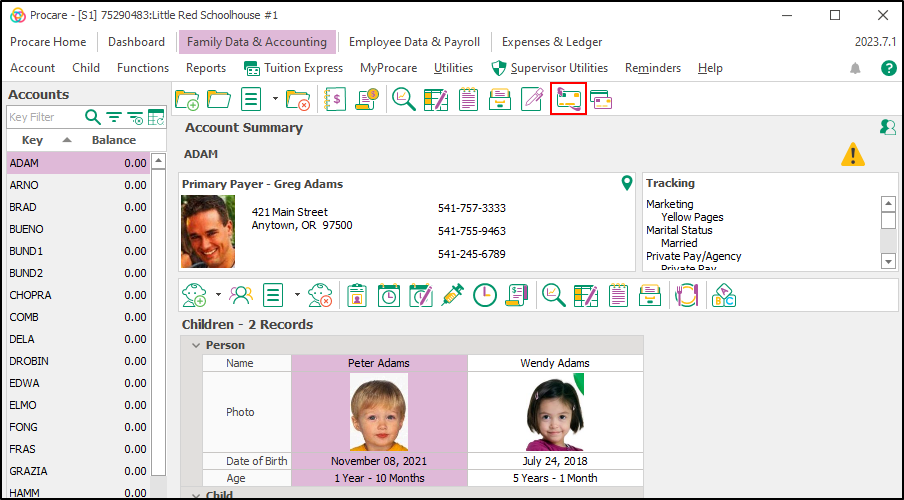
If needed, click the Recurring Payments Request icon to send the form to the family. Read more about sending recurring payment request forms.
FAQ
What does a $0.00 payment mean?
If you notice a payment showing a transaction value of $0, it means the system couldn’t process it due to missing or incorrect information in the payment profile for a transaction that occured between October 5 and October 9. This is not a decline from the bank or payer, rather it’s a validation issue within the system.
A $0 value simply indicates that the payment couldn’t go through and the ledger has been adjusted to keep your records balanced. Starting October 9, these will appear as voids on the ledger, making it easier to track and understand what happened.
What should I do if I see $0.00 postings after October 9?
In the unlikely event that you still see a $0 transaction after October 9, here’s how to resolve it:
Review the payment profile linked to the transaction. Ensure that all required details, such as account numbers, contact information, or other necessary fields, are complete and accurate.
Correct any missing or invalid information in the profile.
Once the profile has been updated, resubmit the payment so it can be processed successfully.
How do I know if a payment profile needs updating?
Try processing a payment:
If it succeeds, the profile is fine.
If it fails, the profile needs to be updated.
Failed payments will be voided and marked as cancelled in the comment section.
What was the -4 payment profile error?
The -4 error is a system validation issue that previously caused payments to fail. With the October 9 update, accounts showing this error will now process successfully and no action is needed to identify or fix these profiles.
While the -4 error may still appear, it no longer blocks payments.
If you do need to update a payment profile, you’ll need to clear and re-enter the information. Otherwise, you can ignore the error and continue processing as normal.