Make this school year your most connected yet! Whether you're welcoming new families or continuing relationships with returning ones, clear communication sets the tone. Explore how Procare’s Engagement Functionality tools can help you stay in touch, keep everyone informed, and create a strong sense of community from day one.
| Need help with Back to School Prep? |

Note
The following tasks can be accomplished in Engagement Functionality. Go to the Launch Engagement button in the top-right corner of Procare Desktop. This will open a web browser to schools.procareconnect.com.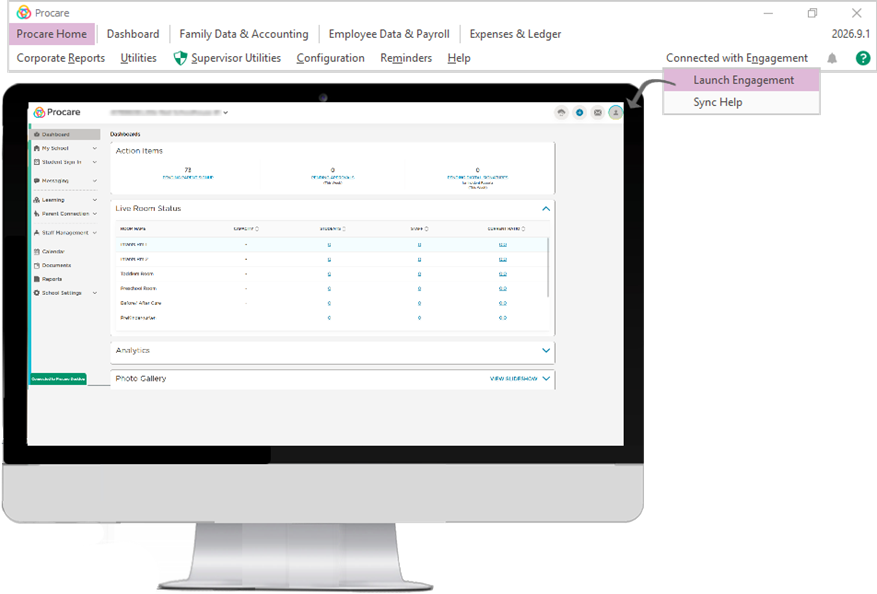
Get New Families | ||
| Invite new families to set up their Procare accounts and track their sign-up progress so they receive updates and can use the Procare App. | |
| Utilize our Parent Training Materials to introduce families to Procare and help them get started smoothly right from the beginning. | |

Sign Students In/Out | |
Review Procare's sign-in/out options and set up the ones you would like to use. | |
Planning to use a method that requires families to use a PIN? Make sure you know how to look up parent PINs and send them to families. | |
If families are responsible for signing students in and out, be sure to share your chosen methods with them. | |
You can provide clear instructions by using our helpful parent articles and viewing these videos. | |
Message FamiliesClear, timely communication builds trust and strengthens family partnerships. With Procare’s messaging tools, it’s easy to stay connected, keep parents informed, and support private conversations when it matters most. |
| Parent Messaging
Parent messaging is available via the Procare website and mobile app. |
| Parents can have private conversations with admins about sensitive topics, such as billing, using Office Chat. | |
| Parent to Admin (Office Chat) Use these resources to help introduce your staff and parents to the messaging options: |
Email Personalized Newsletters
Send newsletters to welcome families to a new year and share important information. Setting up newsletter templates can save time later.
Log Daily Activities
Keep families updated on their child's day with daily activities.
Use the Activity Summary and Activity Feed to keep an eye on all logged activities. | Review any activities that require your approval. |
Share Important Documents
Use the Documents feature to have parents complete required documentation electronically.
Train |
| Directors and Admins |
Learn how to configure:
for staff use and to help families stay in the loop. | ||
Attendance, Daily Activities, and Communications Live Group Training | ||
Procare provides free training for you and your staff to learn how to set up and use all of these features. Join a live training session today or pass along a recorded session. |
| Teachers and Classroom Staff |
Everything a teacher needs to start using Procare on day one, from logging activities and managing check-ins to sending updates families will love. | ||
Procare for Teachers: Mastering the Basics |